Projects & Workflow
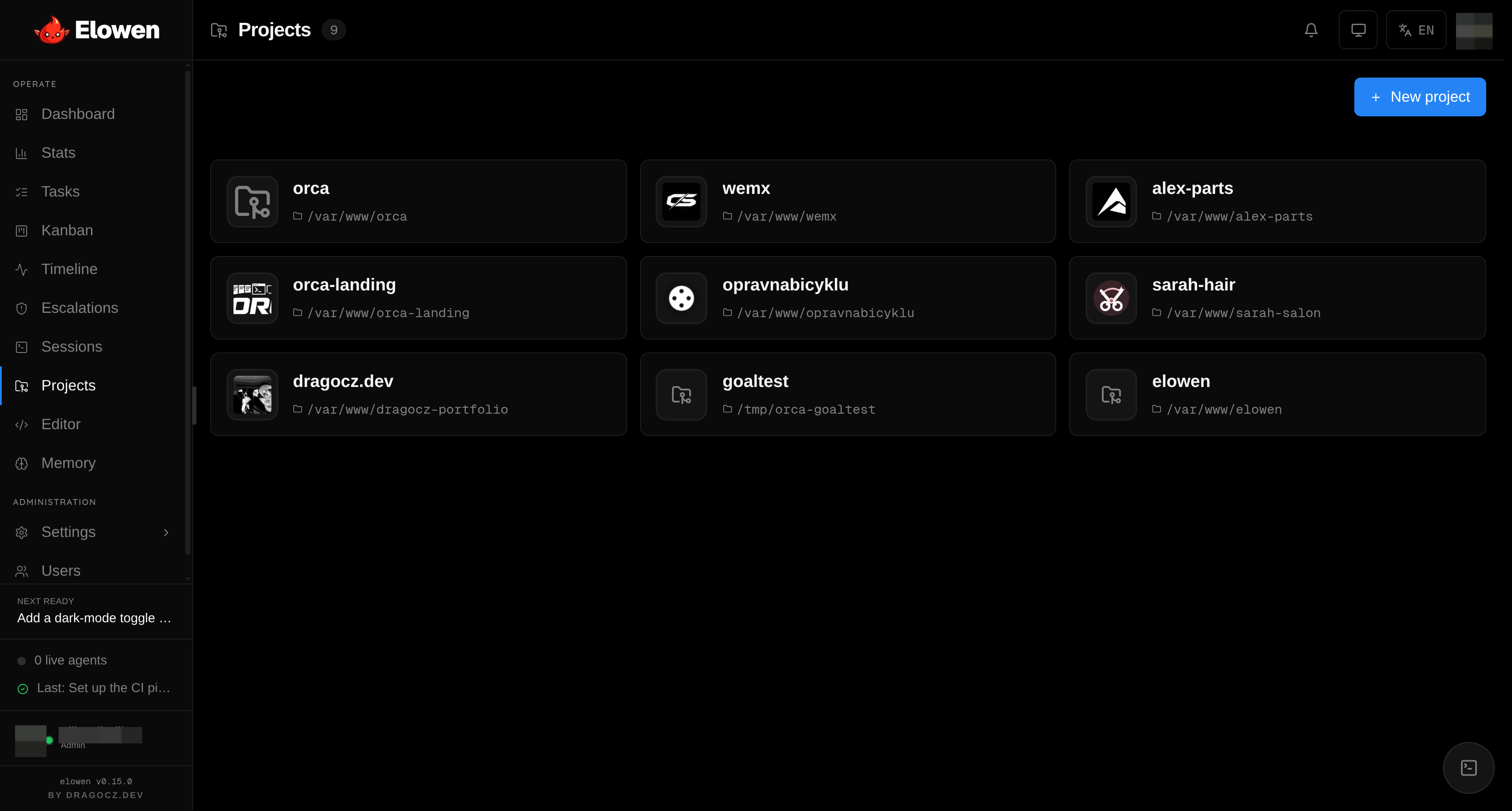
Elowen is an agent you talk to that acts on your code. Projects are how you point that agent at your git repositories and scope exactly what it may touch. Each project maps to a repository on disk and carries its own task queue, missions, and access controls — so the agent always works inside boundaries you set, and you always see what it changed.
This page covers how the agent works against your repos: projects and git integration, the PR-native worktree workflow, the Monaco editor, change snapshots, and the handoff notes agents leave for each other.
Projects
A project is a named handle on one git repository. You register projects in the Projects page, and from there the agent can plan tasks and missions against them, open the editor, and run tools scoped to that repo. Registering a project is admin-only; when you add one, a built-in directory picker (Browse) lets you walk the server's filesystem to select the repository path instead of typing it by hand.
| Setting | Description |
|---|---|
| Slug | Unique identifier, immutable after creation — it appears in API routes (/projects/:id) |
| Path | Absolute path to the git repository on disk — this is the working directory every agent and session runs in |
| Icon | Optional project-relative image (picked from files inside the repo) shown on the card; clears back to a default glyph |
| Notes | Free-form context handed to the planner and Pilot agents when they work this repo |
| PR workflow | Force the PR-native workflow on or off for this project, or inherit the global default |
The Notes field is a simple, high-leverage way to steer the agent: describe the stack, conventions, or "don't touch" areas once, and every task planned against this project inherits that context.
Removing a project detaches it from Elowen — its tasks, missions, agents and access grants are deleted — but never touches the files on disk. The daemon's own home project can't be removed.
Access is per user. Under RBAC, an admin assigns which users
can see and act on each project (user_projects), so one person's agent might
reach three repos while another's is scoped to one. Combined with per-user tool
grants, you decide not just which projects a user reaches but what their
agent may do there.
Git integration
Every project surfaces the live state of its repository, so you can steer the agent with full visibility instead of guessing:
- Current branch
- Clean or dirty working tree — click the dirty badge to open the working diff in the editor
- Ahead/behind counts versus the remote
- Recent commits (hash, subject, author, time) — click one to view its patch
- Branch list, with the current branch highlighted
This is the clarity pillar in practice — before you engage the agent on a repo, you can see exactly where it stands.
PR-native workflow
For anything you want reviewed before it lands, turn on the PR-native workflow. Instead of editing your shared checkout in place, each mission gets its own isolated git worktree, commits per phase, and opens a real pull request you can review.
Toggle it per project (the PR workflow setting) or per mission (inherit / on / off). Configure your GitHub token and PR defaults in Settings → GitHub (see Configuration).
How it works
- Engage with PR mode — the mission runs in PR mode (inherited from the project or set explicitly).
- Worktree — Elowen creates an isolated git worktree at
<repo-parent>/.elowen-worktrees/<slug>-<missionId>, separate from your main checkout. - Isolated work — the agent does all its work inside that worktree, never touching your working branch.
- Per-phase commits — each closed phase commits its changes to the worktree branch.
- PR auto-opens — after the first phase closes, Elowen opens a pull request against the base branch.
- Review feedback ingested — review comments (inline + summary) are pulled back in and handed to the agent.
- Auto-fix rounds — review feedback triggers fix phases on the same branch. A budget of 2 automatic rounds prevents review ping-pong; once it's spent, the mission stalls and escalates to a human via Escalations.
- Merge and clean up — when it's done, the PR merges and the worktree is removed.
Because every PR mission lives in its own worktree, PR missions never block
each other or the shared checkout — they run concurrently and safely. The
shared checkout (non-PR work) allows only one agent at a time, checked
atomically before a task flips to in_progress, so two agents can never trample
the same working tree.
Monaco editor
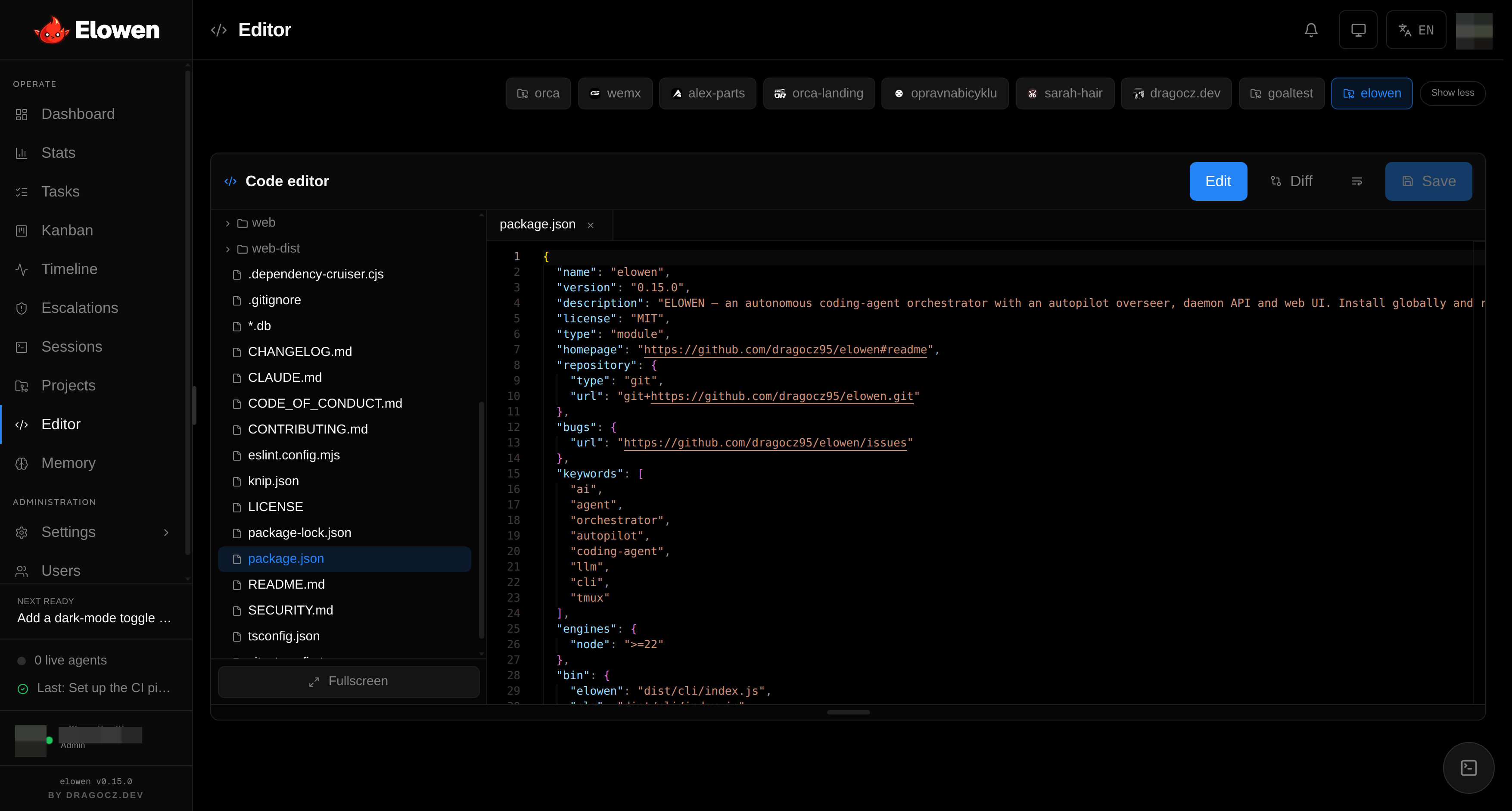
Elowen ships a self-hosted Monaco editor built directly into the web UI — no external service, in keeping with the lightweight, self-hosted design. Select a project card and click Open editor (or right-click a card → Open in editor). It's how you inspect and adjust what the agent produced, or make quick edits yourself. Because a project's path is the repo on disk, the editor operates directly on that working directory — the same one agents run in.
| Component | Purpose |
|---|---|
| File tree | Browse project files, with dirty-state highlights |
| Tabs | Multi-file editing with dirty indicators |
| Editor pane | Monaco with an OLED-friendly theme |
| Diff mode | Working changes versus HEAD |
| Patch view | Unified diff for a specific commit |
| Preview | Inline image and Markdown preview |
| Context menu | Right-click for new file/folder, rename, duplicate, delete |
The editor is one of several ways to observe and steer the agent — see the full tour on the Web UI page.
Change snapshots
Every task keeps a permanent record of what the agent changed, so nothing the agent does is opaque:
- At spawn — the current
HEADis stamped on the task as abase:<sha>label. - While it runs — whenever the agent's checkout advances past the last
recorded head, Elowen refreshes the task's frozen snapshot: the list of changed
files (with their change type) plus the
baseandheadSHAs. The change feed updates live, not only at close. - Viewing — the task detail lists the commits the phase landed
(
base..head) and a per-file diff for each, fetched on demand from the task's checkout.
The result is a per-phase change record visible in the task detail and the Timeline, so you can always answer "what did this phase actually do?"
Git operations on a single checkout are serialized through a KeyedMutex — only
one agent reads HEAD or commits at a time — while different checkouts
(worktrees) run concurrently. That's what lets many PR missions proceed in
parallel without corrupting any one repository.
Handoff notes
Missions run in phases, and a later phase often needs context only an earlier agent had. Agents leave each other handoff notes for exactly this:
# Leave a note for later phases of a mission
elowen note add <missionId> "Set up the KeyedMutex in src/shared/keyedMutex.ts"

# Read all notes left by earlier phases
elowen note ls <missionId>
The worker prompt instructs every agent to read the notes at the start of its phase and leave notes at close, so knowledge carries forward across a mission instead of being lost between phases. See the full command reference on the CLI page.
© 2026 Elowen · MIT Licensed
Reference on GitHub