
Brain & Chat
The agent you talk to
Elowen is the brain. The brain is the embedded agent core you chat with — it reasons, calls tools, edits files, runs commands, loads plugins and skills, remembers what matters, and can even wake itself up on a schedule. Everything else in the product — the Dashboard, Kanban, Timeline and Sessions — exists so you can watch and steer this agent. The brain is Elowen's identity; the dashboards are the window onto it.
You reach the same agent from four places: the web dock, the CLI, Discord, and WhatsApp. Same reasoning, same tools, same memory — just a different surface. And because Elowen is modular to the core, every one of those capabilities (each chat platform, each tool, memory, skills) is a plugin you can add or remove. Nothing here is baked in; it's all Plugins.
Architecture
Under the hood the brain is a multi-provider AI engine. You don't need this to use it, but it helps to know how the pieces fit when you're configuring or extending Elowen:
| Component | Purpose |
|---|---|
| BrainService | Per-user lifecycle — start, stop, status |
| PlatformOrchestrator | Routes each message through the right provider, tools, and plugins |
| ChannelSessionService | Per-channel session management (web, CLI, Discord, WhatsApp) |
| LiveSessionRegistry | Tracks active brain sessions |
| PluginRegistry | The loaded plugins, tools, skills, and context providers |
The important takeaway: it's a small, self-hosted engine with a clean, modular design. Lightweight app, professional-grade code — you run the whole thing yourself.
Chat interfaces
The agent is the same everywhere; only the surface changes.
Web dock
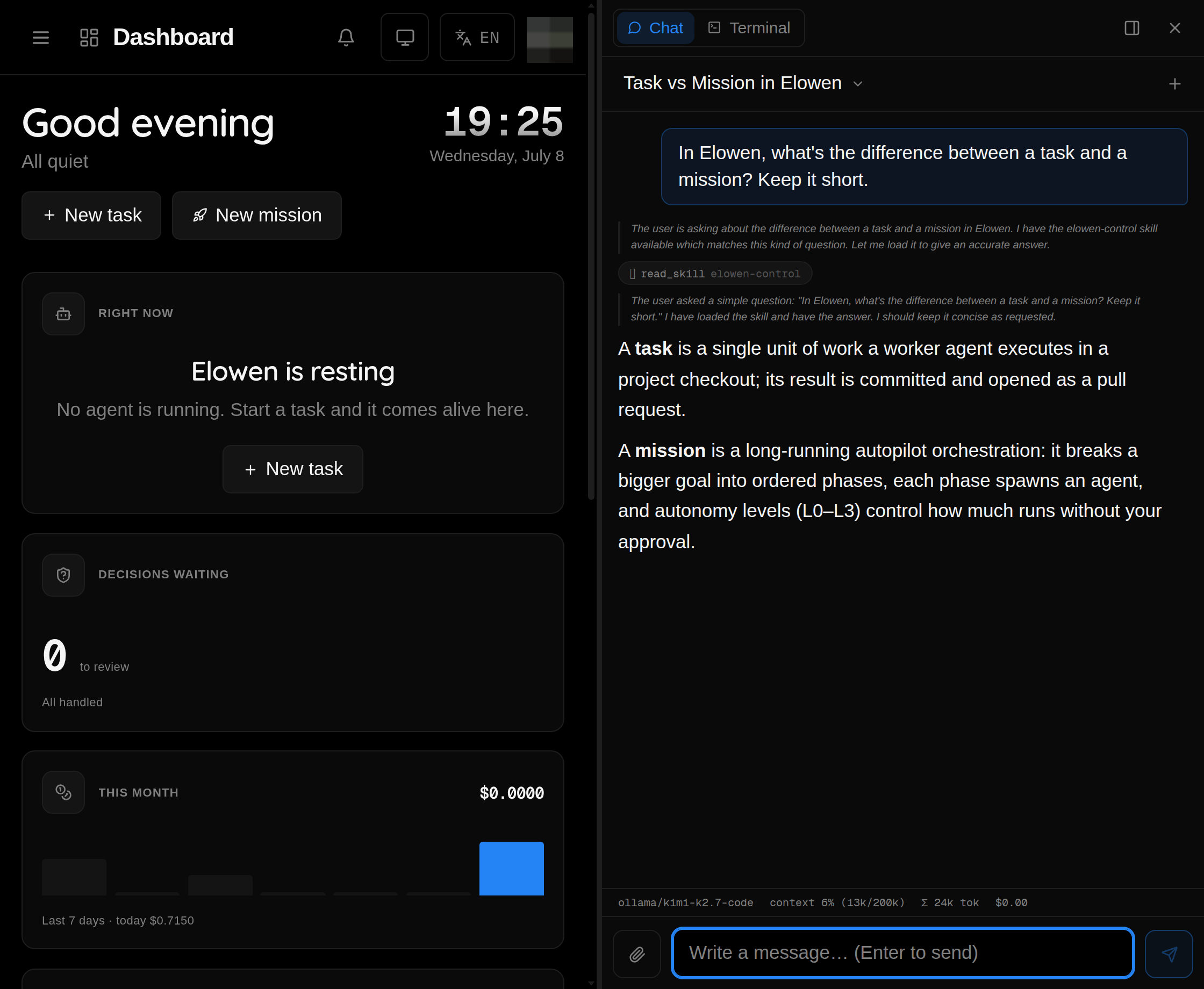
The web dock is a resizable side panel that follows you across the whole web UI, so the agent is one click away no matter which module you're in. It has two modes:
- Chat — talk to the brain directly, with full conversation history, tool-call traces so you can see exactly what it did, a per-conversation model picker, and auto-compact to keep long threads within context.
- Terminal — a live view onto a running agent session (a tmux-spawned worker or a live session), for when you want to watch or intervene in real time.
CLI chat
elowen chat                  # start an interactive chat
elowen chat --new            # fresh conversation
elowen chat --session <id>   # resume a past conversation
The CLI chat uses an opencode-style layout: tool glyphs, a status bar, and inline diffs when the agent edits files — the full agent, right in your terminal. See CLI for the complete command reference.
Discord & WhatsApp
Both chat platforms are plugins. Add the Discord bot to bring the agent into your server, or the WhatsApp plugin (built on Baileys) to chat from your phone. Both support a per-chat / per-channel model picker and streamed replies, so answers appear as they're generated. Setup for each lives in Plugins.
Conversations
The brain keeps distinct, resumable conversations:
- New — start fresh; the conversation gets a unique session id.
- Resume — pick up any past conversation with its full history intact.
- Search — fulltext search across everything you've ever discussed.
Conversations persist in SQLite (~/.config/elowen/elowen.db) and survive daemon
restarts, so nothing is lost when you restart Elowen.
Model catalog
The model picker aggregates every model available to you from three sources:
| Source | Example |
|---|---|
| Manual providers — statically configured | OpenAI, Anthropic |
| Auto-fetch — pulled live from the provider API | /v1/models endpoint |
| OAuth-connected accounts | Anthropic, GitHub Copilot, OpenAI |
Configure it all in Settings → Elowen AI. Each provider carries its own API key, base URL, and model list, so you can mix and match freely.
Supported providers
The elowen setup wizard ships presets for the common providers, so you usually
just pick one and paste a key. Each is an OpenAI-compatible (or Anthropic
Messages) endpoint — for anything not listed, choose Custom OpenAI-compatible
endpoint and enter its base URL by hand.
| Provider | Base URL |
|---|---|
| OpenAI | https://api.openai.com/v1 |
| Anthropic (Claude) | https://api.anthropic.com |
| OpenRouter | https://openrouter.ai/api/v1 |
| Google Gemini | https://generativelanguage.googleapis.com/v1beta/openai |
| xAI (Grok) | https://api.x.ai/v1 |
| DeepSeek | https://api.deepseek.com/v1 |
| Groq | https://api.groq.com/openai/v1 |
| Mistral | https://api.mistral.ai/v1 |
| Together AI | https://api.together.xyz/v1 |
| Fireworks AI | https://api.fireworks.ai/inference/v1 |
| Cerebras | https://api.cerebras.ai/v1 |
| Perplexity | https://api.perplexity.ai |
| DeepInfra | https://api.deepinfra.com/v1/openai |
| Moonshot (Kimi) | https://api.moonshot.ai/v1 |
| Z.AI (GLM) | https://api.z.ai/api/paas/v4 |
| NVIDIA NIM | https://integrate.api.nvidia.com/v1 |
| Hugging Face | https://router.huggingface.co/v1 |
| Baseten | https://inference.baseten.co/v1 |
| Ollama Cloud | https://ollama.com/v1 |
Aggregators like OpenRouter and Hugging Face expose many upstream models behind a single key. For subscription sign-in instead of raw keys (Claude, GitHub Copilot, ChatGPT/Codex), see below.
Chat smoke-test
Whichever provider you connect, elowen setup runs a chat smoke-test — one
tiny, real completion — before it lets you move on, so you know the model
actually answers rather than just that a key was saved. Run elowen doctor any
time for a readiness report — chat, tasks, missions, memory, platforms and
plugins — to see what works and how to fix the rest.
Any provider that passes the smoke-test is enough to run ordinary
tasks — they execute on Elowen's built-in engine
(elowen:<provider>/<model>), no separate agent CLI required. Multi-phase
missions (plan → engage → execute) need one step more: either an
OpenAI-compatible key for the planning relay, or an installed agent CLI as the
Pilot.
Connect your AI accounts (OAuth)
Rather than paste raw API keys, you can link your existing AI subscriptions directly:
- Anthropic — your Claude account
- GitHub Copilot — your Copilot subscription
- OpenAI — your OpenAI account
Once linked, connected accounts show up as ordinary providers in the model picker — pick their models per conversation just like any other.
Memory
The agent remembers across conversations, so context you shared last week is still there today. Memory is per-user and private: each person reaches only their own memories — from their own Elowen chat or a linked platform account (Discord/WhatsApp) — never another user's, never the operator's. Nothing bleeds between accounts.
Two things happen automatically around every exchange:
| Stage | What happens |
|---|---|
| Recall | Before the reply, the most relevant durable memories are retrieved and injected into the turn — framed as user-provided context, never instructions, so a stored note can't hijack the agent. Semantic when an embedding model is configured, keyword otherwise. |
| Curation (save) | After the exchange settles, a cheap model distills any durable, reusable facts — stable preferences, decisions, project paths, gotchas — and applies a small, capped batch of edits (add / update / merge / delete). Greetings, transient state and one-off debug steps are deliberately ignored; most turns save nothing, and that's expected. |
Both are per-user toggles in Account → Memory (Auto-recall / Auto-save),
read fresh each turn so a flip applies immediately — no restart.
The agent also carries explicit memory tools — search, add, update, merge, delete, list recent, and manage categories — to curate memory on demand. They're locked to the acting user: a task worker or an unlinked platform sender gets no access at all.
| Feature | Description |
|---|---|
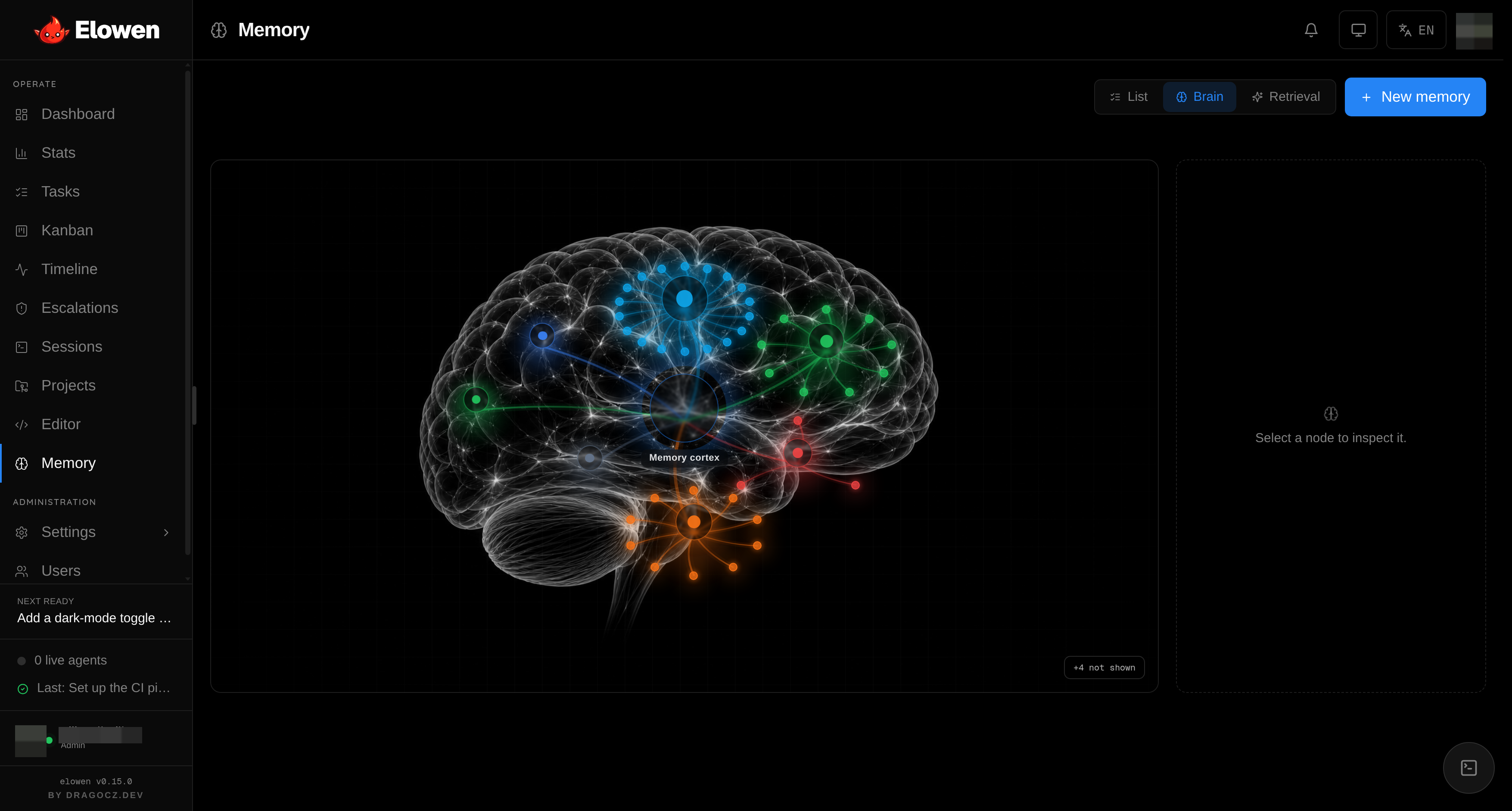
| Categories | Memories are organized by topic, with best-effort LLM auto-classification of each new fact |
| Glass-brain | A visual memory map in the Memory module — see how memories cluster and connect |
Semantic recall needs an embedding model: pick the provider, model and dimensions in Settings → Memory, where you can also re-index the whole store. Everything persists in SQLite, so you can see, merge and purge what the agent knows about you — clarity all the way through.
Communication style
Each user can give the agent a communication style — a system-prompt fragment that shapes its tone and behavior. Communication styles are per-user and per-platform, so the agent can be terse and technical in the CLI, friendlier on Discord, and formal on WhatsApp — all for the same underlying brain. Set yours in your account settings.
Reasoning effort
Control how hard the model thinks before it answers:
| Level | Effect |
|---|---|
minimal | Fast, direct answers |
low | Some reasoning |
medium | Balanced |
high | Thorough |
xhigh | Maximum reasoning |
Set it per conversation in chat (the /think command), per channel on
Discord/WhatsApp, or as a default in your account settings.
Limits
Settings → Elowen AI carries a Limits card — operator-tunable ceilings that let you trade cost, verbosity and latency to taste. Every value is a whole number clamped to a safe range: the daemon re-clamps whatever you type, so a field can never be pushed somewhere dangerous. The defaults are sensible; leave them unless you have a reason.
| Limit | What it controls | Default (range) |
|---|---|---|
| Tool output — lines / chars | How much of a tool's output the expanded view shows before it's clipped | 80 lines / 12000 chars (20–400 / 2000–50000) |
| Question timeout | How long a parked ask_user_question waits for an answer before auto-resolving as "no answer", so a turn never hangs forever | 5 min (30 s–30 min) |
| Memory recall — count / chars | How many memories, and how many characters of them, get injected per turn | 6 / 1500 chars (1–20 / 300–8000) |
| Goal turn budget | Autonomous turns a /goal runs before it pauses for you to confirm | 8 (1–50) |
| Goal safety ceiling | Absolute cap on goal turns — even in YOLO the loop stops here so a runaway goal can't burn tokens forever | 64 (8–500) |
| Live channel sessions | How many live channel conversations stay resident before the least-recently-used is dropped (its history stays in the DB) | 32 (4–256) |
Sitting beside them is Max steps — the ceiling on model round-trips per request (Discord shows "Step N / MAX"), 1–200, default 20 — the guard against a turn looping forever.
Tools are per-user
What the agent can do is governed by Elowen's RBAC. Under Settings → Users, an admin can give each user a different set of tools and permissions — grant one person the terminal and files tools while another gets chat only, and scope each user to specific projects. The agent you chat with only ever wields the tools you're allowed to use. See Account & Security for the full model, and remember: every tool is itself a plugin you can grant or revoke.
© 2026 Elowen · MIT Licensed
Reference on GitHub