
Configuration
Elowen is the personal AI agent you chat with — it reasons, calls tools, edits
files, and runs work for you. This page is how you tune that agent. Almost
everything works out of the box with sensible defaults, so most of the time you
change nothing; when you do want to steer behaviour, you do it in the
Settings page, backed by the daemon's GET /config and PUT /config API.
Simplicity is a core promise here: low friction, few required knobs, and edits
that auto-save immediately.
Configuration comes in two layers:
- Environment variables — read once at process start (ports, paths, bind address, bootstrap credentials). Set these before launching the daemon.
- Runtime config — everything you can change live in the Settings page. Grouped into nine categories that mirror the daemon exactly.
Settings live in the Config group of the web UI and are admin-gated. If you
manage a multi-user install, remember Elowen has full RBAC: roles are admin and
member, and each user can carry a different set of tools and permissions
(which executors they may run, which brain tools are disabled for them, which
projects they see). Configuration below is workspace-wide; per-user grants live
in Account & Security.
Environment variables
Set these before the daemon starts. See CLI for how the elowen binary
reads them.
| Variable | Default | Description |
|---|---|---|
ELOWEN_URL | http://localhost:4400 | Daemon URL for CLI |
ELOWEN_TOKEN | — | API token for CLI requests |
ELOWEN_AUTOSTART | 1 | Auto-start daemon from CLI |
ELOWEN_DB | ~/.config/elowen/elowen.db | SQLite database path |
ELOWEN_PORT | 4400 | Daemon HTTP port |
ELOWEN_HOST | 127.0.0.1 | Daemon bind address (0.0.0.0 to expose) |
ELOWEN_PROJECT | elowen | Default project slug |
ELOWEN_PROJECT_PATH | cwd | Default project working directory |
ELOWEN_RELAY_URL | — | LLM relay base URL |
ELOWEN_RELAY_KEY | — | LLM relay API key |
ELOWEN_RELAY_MODEL | gpt-4o-mini | LLM relay model |
ELOWEN_BOOTSTRAP_USER | — | Initial admin username |
ELOWEN_BOOTSTRAP_PASS | — | Initial admin password |
ELOWEN_ALLOW_OPEN | — | Open (no auth) mode when 1 |
ELOWEN_LOG_LEVEL | info | Log level (debug/info/warn/error) |
ELOWEN_LOG_DIR | cwd/logs | Log directory |
ELOWEN_DAEMON_URL | http://localhost:4400 | Daemon URL for web BFF proxy |
ELOWEN_WEB_PORT | 4500 | Web UI port |
ELOWEN_CLI | elowen | CLI binary path (for spawned agents) |
The daemon serves the REST API on :4400, the Next.js web UI runs on
:4500, and the SQLite database sits at ~/.config/elowen/elowen.db. This small,
self-hosted footprint is the point — a lightweight app with professional-grade
code that you run yourself.
Runtime config
Everything below is edited in the Settings page and persisted through
GET /config / PUT /config. The sections appear in the same order as the real
Settings categories: Models, CLI Agents, Elowen AI, Memory, Plugins, Autopilot,
GitHub, System, Data. There is no separate "Defaults" category — the old
per-task defaults now live where they belong: the mission run defaults under
Autopilot, the login-token TTL under System. Almost every edit auto-saves
the moment you make it — there are no Save buttons anywhere.
Models
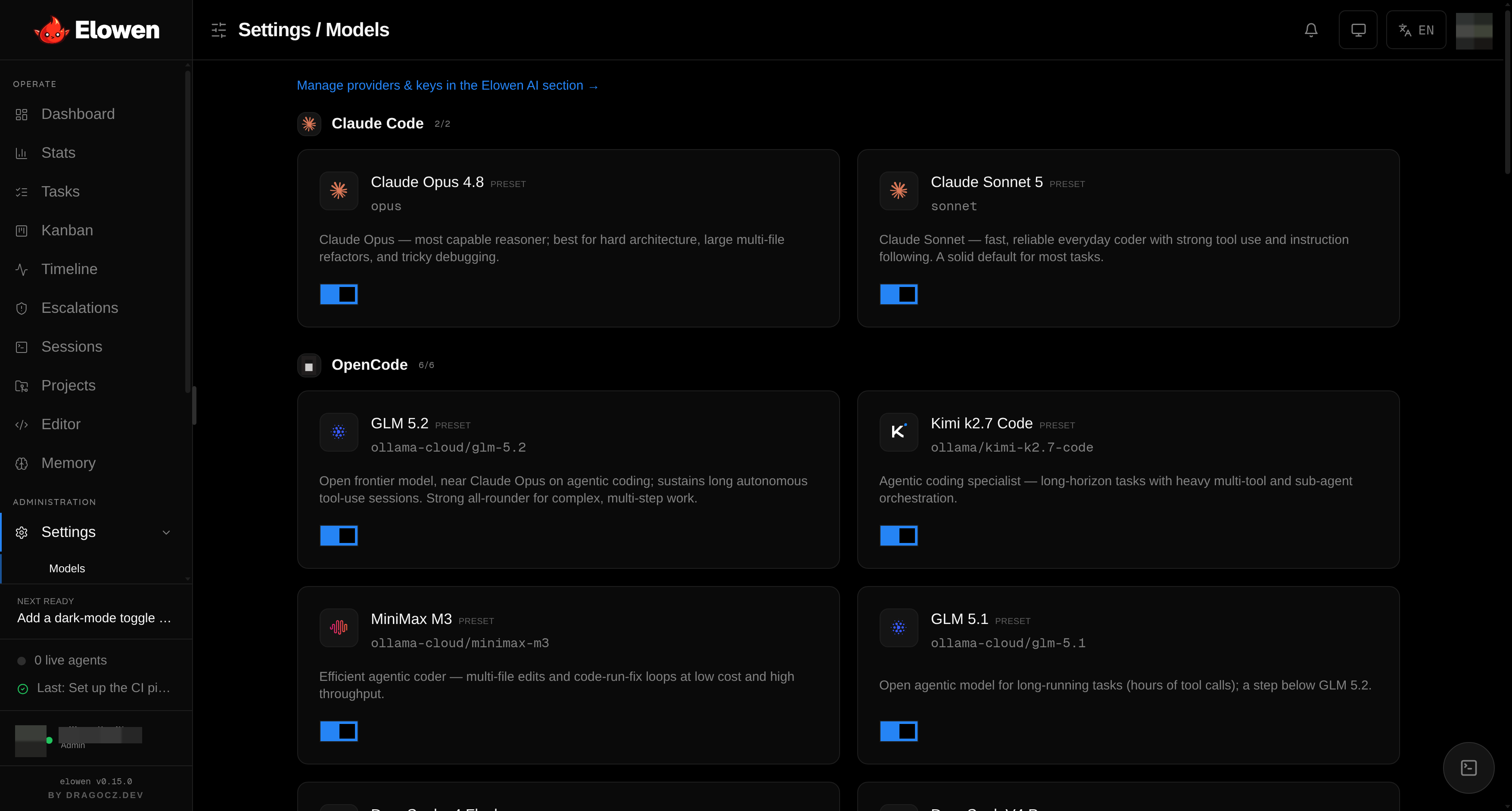
The model catalog defines which models the agent and its workers can use. Models are grouped by the engine that runs them — the same grouping the executor picker shows users — so what you enable here is exactly what they can pick.
| Setting | Description |
|---|---|
| Presets | Built-in catalog: sonnet, opus, codex:gpt-5.5, ollama-cloud/deepseek-v4-flash, ollama/kimi-k2.7-code, ollama-cloud/minimax-m2.7, ollama-cloud/glm-5.2, ollama-cloud/qwen3.5, and more |
| Custom models | Add any model by label, engine, and model ID |
| Model notes | Free-text descriptions the autopilot planner reads when it picks a model |
| Context window | Per-model max-context override (Elowen AI models only) |
allowedExecs | Which executors may be spawned (global allow-list) |
Toggle a preset on or off, add a custom model, or edit a label — every toggle,
add, edit, and note change auto-saves immediately. Model notes are the free
text the autopilot planner reads when it chooses a model for a task, so a good
note ("cheap, fast, good for boilerplate") directly improves autonomous model
selection. For Elowen AI models a small gauge pill lets you pin a max context
window when the endpoint doesn't report a reliable one. The global allowedExecs
allow-list is the workspace ceiling; per-user allowed_execs narrows it further
for individual members (see Account & Security). The engines
and keys these models run on are configured in Elowen AI below.
CLI Agents
Elowen can drive four external coding-agent CLIs — Claude Code (claude-code),
OpenCode (opencode), Codex (codex), and Kilo Code (kilo) —
alongside the embedded Elowen AI brain (which has no binary to configure and
simply links here to its own section). This section configures each CLI.
| Setting | Per provider |
|---|---|
| Binary | Override the default CLI binary location |
| Extra args | Additional CLI flags passed on every spawn |
| Skip permission prompts | Bypass the CLI's per-action confirmation |
| Resume prior sessions | Continue the prior CLI session on respawn |
Point each agent at a non-standard binary, append extra flags, or enable session resume so a respawned agent picks up where it left off. Note: for Kilo Code the Skip-permissions toggle is a no-op — Kilo's auto-approval lives in Kilo's own config, not in Elowen.
At the top of this section sits the Agent skills card. It installs and
verifies the elowen-workflow skill into the very CLI agents configured below, so
they know how to run inside an Elowen orchestration. The daemon self-installs on
startup; the card shows a per-agent status pill and a button to re-apply on
demand. See Agents & Autonomy for how executors map to
autonomy levels.
Elowen AI
Elowen AI is the embedded agent core you chat with in the web dock, the CLI, and the chat platforms. This section is its identity, its runtime limits, and the model providers behind it.
| Setting | Description |
|---|---|
| Agent name | The assistant's display identity (default Elowen); feeds the persona everywhere it speaks |
| Max steps | Per-run agent step ceiling (1–200, default 20); the turn aborts once it's hit |
| Limits | Eight tunable ceilings that used to be hardcoded (see below) |
| OAuth accounts | Connect Anthropic (Claude), OpenAI (Codex), or GitHub Copilot |
| Providers | API-key providers: OpenAI-compatible or Anthropic endpoints |
The Limits card exposes the constants that shape the brain's cost, verbosity,
and latency: tool-output caps (max lines / max chars), the ask_user_question
wait timeout, memory recall size (count and chars), the goal-loop turn budget and
its safety ceiling, and the live-session cap. Each is clamped to a sane range —
edit to taste, the daemon re-clamps anything out of bounds.
Providers come in two flavours. OAuth accounts connect a Claude, Codex, or
Copilot login (no key stored — tokens live in the brain's own auth store) and
after connecting you pick which of the account's models to expose. API-key
providers point at an OpenAI-compatible or Anthropic endpoint with a base URL,
a key, and a model list — Elowen live-probes the endpoint's /models so you click
model pills instead of typing IDs, and for OpenAI-type entries you can pin the
wire API (auto / Responses / Chat Completions). Keys are write-only: you set
them here, the daemon never returns them in any response.
Memory
The agent's long-term memory turns past events into recallable knowledge. This section picks the two workspace-level models that power it.
| Setting | Description |
|---|---|
| Embedding provider + model | Converts memories into vectors for semantic recall |
| Dimensions | Optional embedding vector width hint |
| Categorization provider + model | Sorts memories into categories |
Both models inherit their API key and endpoint from the referenced Elowen AI provider — there is no separate base URL to fill in, and OAuth accounts (which expose no embeddings endpoint) are excluded from the embedding picker. Leave a provider/model empty to disable that half; with no embedding model, recall degrades to plain keyword search. A Test button probes the embedding endpoint live, Reindex re-embeds memories still missing a vector, and Reclassify runs the categorization model over uncategorized memories. The stored memories themselves live in the Memory module of the Operate group.
Plugins
Every capability in Elowen is a plugin you add or remove — chat platforms, tools, memory, automation, UI, security, and development. Each installed plugin renders its own config section here, generated from that plugin's schema, and each section is its own collapsible so the page stays clean and uncluttered. Install, update, and uninstall plugins through the marketplace; a bundled plugin you don't want is soft-removed (hidden, never deleted, restorable). See Plugins for the full catalog and the marketplace flow.
Because tools are plugins, and brain tools can be disabled per user, this is also where the workspace-wide plugin set is defined that per-user grants then narrow — one member can have terminal + files, another only chat.
Autopilot
Autopilot is Elowen's automated planning and execution. First you pick how it reasons — one of two backends — then the mission run defaults apply to whatever it launches.
| Setting | API Key | CLI Tools |
|---|---|---|
| Backend | Planner + overseer run as models via an API key — fast, cheap, repo-blind | Planner + overseer run as CLI tools inside the repo — they read the code, but must be installed |
| Credentials | Reuse a saved Elowen AI provider, or enter an endpoint + key | Not needed |
| Planner / Overseer | A model name each | An executor each |
| Review on completion | — | Optional review pass when a phase reports done |
API Key mode is the lightest way to get planning: pick a Credentials provider (reusing an Elowen AI provider's endpoint + key, so no key is typed twice) or enter a raw endpoint and key, then name the planner and overseer models. CLI Tools mode runs the planner and overseer as real agents in the repository that plan and execute through the same executors your tasks use. A free-text Notes field lets you hand the planner standing guidance.
Below the backend split sit the Mission run defaults — what the pilot actually launches, in either mode:
| Setting | Default | Description |
|---|---|---|
| Executor | sonnet | Default worker model (can be an Elowen AI model) |
| Autonomy | L3 | Default autonomy level |
| Max sessions | 1 | Default parallel agents |
Autonomy levels L0–L3 control how much a worker may do without asking — see Agents & Autonomy.
GitHub
Connects the agent to your repositories so it can branch, commit, and open PRs. A
status banner at the top tells you how Elowen will push — as a signed-in gh CLI
account, with a stored token, or not at all.
| Setting | Description |
|---|---|
| GitHub token | Access token, write-only (used when gh isn't signed in) |
| PR workflow | Turn the PR flow on/off — this is the default for new projects, each project can override it |
| Base branch | Default PR target branch (blank = auto-detect) |
| Open PRs automatically | Open the PR without waiting for you |
| Verify command | Shell command run as the quality gate before a PR closes |
The verify command is your quality gate — the agent runs it before a PR is closed, so a failing build or test suite blocks completion. See Projects & Workflow for the full git flow.
System
System is the running instance's health and update controls, plus the one server-wide security knob.
- A hero showing the current Elowen version, whether an update is available on npm, and an Update now button (blocked while a mission is running).
- Automatic updates — an opt-in toggle (off by default). When on, a background timer upgrades to the latest npm release and restarts the services, but only while no mission is running.
- Service status for the daemon (
:4400) and web UI (:4500), each with a one-click restart. - Login token validity — how many days an issued auth token stays valid (default 30). It's a server-wide security setting, so it lives here rather than among the per-task defaults.
Data
Data is the danger zone. It is admin-only and holds destructive actions — notably Delete all data, which removes every task, mission, and the timeline and stops all running sessions (projects, users, and settings are kept). It is gated behind the admin role and kept separate from everyday settings. Treat it with care; there is no undo.
For the underlying process model, ports, and where state is stored, see Architecture.
© 2026 Elowen · MIT Licensed
Reference on GitHub