
Agents & Autonomy
Elowen is a personal AI agent you talk to — it reasons, calls tools, edits files and runs commands on your behalf. When a job is big enough to warrant its own coding agent, Elowen spawns one for you: a real CLI coding assistant working inside a live session. This page explains how Elowen drives those agents and how it governs them with graduated autonomy, so you always stay in control and can see exactly what the agent is doing.
Autonomy is where two of Elowen's pillars meet: clarity — every decision an agent makes is visible and steerable — and simplicity — sensible defaults mean the agent handles the routine and only interrupts you when it genuinely needs a human.
Providers
Elowen can drive four external coding-agent CLIs, plus the embedded Elowen AI brain that runs in-process (the agent you chat with directly). You pick a provider per task; the model picker in chat and task creation offers whatever you are allowed to run.
| Provider | Exec prefix | Program | Notes |
|---|---|---|---|
| Claude Code | claude: | claude-code | Default; bare specs like sonnet route here |
| OpenCode | opencode: | opencode | Also the target for bare provider/model specs |
| Codex | codex: | codex | OpenAI's agentic coder |
| Kilo Code | kilo: | kilo | Auto-approval lives in Kilo's own config (see below) |
| Elowen AI (brain) | elowen: | elowen | Embedded — runs in-process, no external CLI spawned |
The brain uses elowen:<provider>/<model> specs (for example
elowen:relay/ollama/kimi-k2.7-code) and is bounded by your configured brain
providers rather than the CLI allow-list. See Brain & Chat for
the embedded agent, and Configuration for provider setup.
Executor resolution
Every task carries an exec:<spec> label that tells Elowen which agent to spawn.
The daemon resolves the spec to a program like this:
exec:sonnet→ Claude Code with modelsonnetexec:opus→ Claude Code with modelopusexec:opencode:deepseek-v4-flash→ OpenCode with modeldeepseek-v4-flashexec:codex:gpt-5.5→ Codex with modelgpt-5.5exec:kilo:<model>→ Kilo Code with that modelexec:ollama/deepseek-v4-flash→ a bare spec containing/routes to OpenCode- No label → the configured fallback (default: Claude Code /
sonnet)
A bare plain string (no prefix, no /) is only valid when it is explicitly
allow-listed — otherwise Elowen would silently treat it as a Claude Code model
name, so it is rejected.
Every exec must be in the daemon's allowedExecs list or the API rejects the
task. On top of that, non-admin users can be scoped to a personal subset of
execs — this is part of Elowen's per-user tools and permissions model, where each
user can have a different set of capabilities. An admin can let one user run
Opus and Codex while another is limited to a cheap OpenCode model. See
Account & Security for per-user allowed_execs.
Provider configuration
Configure each provider in Settings → Providers:
- Binary path — override where the CLI binary lives
- Extra args — additional flags passed on every spawn
- Skip permissions — bypass the CLI's own approval prompts (for example
--dangerously-skip-permissionsfor Claude Code) - Resume sessions — when enabled, a respawned agent reattaches to its prior CLI conversation instead of cold-starting (see Session resume)
Kilo Code gotcha: Kilo's skip-permissions toggle in Providers is a no-op. Kilo's auto-approval is controlled inside Kilo's own configuration, not by an Elowen flag — set it there.
Autonomy levels
Every mission runs at one of four autonomy levels (L0–L3). The level decides how much the agent may do without asking you, and how confident the overseer must be before it auto-approves an action.
| Level | Name | Prompt handling | Escalation |
|---|---|---|---|
| L0 | Recommend | All prompts → human | Never auto-approves anything |
| L1 | Assist | Overseer approves at ≥ 0.85 confidence | Uncertain or sensitive actions |
| L2 | Pilot | Overseer approves at ≥ 0.6 confidence | Ambiguous situations |
| L3 | Auto | Overseer approves at ≥ 0.6 confidence | Only when the agent is stuck |
L1–L3 spawn agents automatically and let them run. L0 plans and proposes but never executes without your explicit approval — the safest setting when you want to review everything first. You set the level per mission and can change it at any time from the Dashboard.
Overseer (decision gate)
The overseer is the gate that vets every agent action before it takes effect — task dispatch, CLI permission prompts, and post-completion reviews. It runs one of two ways depending on whether you point it at an executor.
Relay path (default)
When overseerExec is empty, decisions go through an LLM relay using the
autopilot.overseerModel. The model scores each request for confidence, and the
gate applies a simple threshold:
- Approved — confidence ≥ the level's threshold → the agent proceeds
- Rejected — confidence < threshold → the request waits for a human
- Destructive — always escalated; the overseer can never auto-approve it
This is the low-friction default: no extra agent to run, decisions resolve in line.
Agent path (parked overseer)
When overseerExec is set (for example sonnet), Elowen spawns a dedicated,
parked overseer agent per active mission. It runs a fully async long-poll
loop:
elowen overseer poll— absorbs heartbeats and surfaces pending decisions- Judges the request using the prompt in
prompts/overseer.md elowen overseer decide --id <id> --approve --confidence 0.85— submits its verdict
Because it is async, the mission keeps moving while the overseer thinks. There is no fixed per-decision timeout; instead the liveness sweep watches the overseer's own pane. If the parked overseer dies or wedges, its pending decisions escalate to a human so nothing slips through unreviewed.
Deriver (prompt detection)
The deriver is how Elowen knows what a live agent is doing. It polls every active agent's tmux pane every 5 seconds and detects state changes from the terminal output — including the CLI's own permission prompts.
| Program | Detects | Trigger |
|---|---|---|
| OpenCode | Permission | Permission required + Allow/Reject |
| Claude Code | Workspace trust | Yes, I trust this folder |
| Claude Code | Permission | Do you want to proceed? |
| Codex | Command approval | Allow command? / Approve this command? |
Auto-accept prompts like workspace trust are cleared directly by the deriver without an overseer round-trip — there is nothing for a human to decide there. Everything else becomes a decision on the bus.
The deriver emits signals to the SSE event bus that drive the live views across the Web UI:
| Signal | Meaning |
|---|---|
working | Agent is active, no prompt detected |
needs_input | Agent is paused, waiting on a human |
complete | Task is closed — final signal |
Decision taxonomy
The overseer handles five kinds of decision, each enqueued by a different part of the system:
| Kind | Enqueued by | Context |
|---|---|---|
prompt | Deriver | A CLI permission prompt from the agent |
review | Close handler | Post-completion review: task title, outcome, summary |
question | Deriver | A multiple-choice question from the agent |
message | Agent (elowen ask) | Free-text Q&A with the autopilot |
check | Liveness sweep | Routine progress check on a working agent |
The confidence threshold that separates approve from wait is 0.85 at L1 and 0.6 at L2 and L3.
Liveness & progress checks
To make sure a wedged agent never sits silently, a liveness sweep runs every
30 seconds and uses one tool-agnostic signal — a PaneActivityTracker that
hashes each pane's content and compares it to the last look. A working agent
streams output so its pane keeps changing; a wedged or idle one goes static, and
the sweep acts:
| Check | After | Action |
|---|---|---|
| Worker wedge | 5 min idle | Wake the overseer — it nudges, restarts, or (after repeated nudges) escalates |
| Routine progress | 15 min working | Ask the overseer "is this still on track?" — it may steer, never escalates a healthy agent |
| Overseer wedge | 10 min idle | Escalate its pending decisions to a human |
| Dead overseer | 90 s gone | Escalate its pending decisions (a 60 s watchdog tries to re-park it first) |
| Absolute backstop | 30 min in any state | Escalate |
Agent Q&A (elowen ask)
A working agent can ask a free-text question mid-mission — to the autopilot or to you:
- The agent calls
elowen ask "Is this approach correct?" - The autopilot answers directly, or escalates the question to a human
- Unanswered questions surface in the Escalations inbox
- You reply, and the agent receives your answer and continues
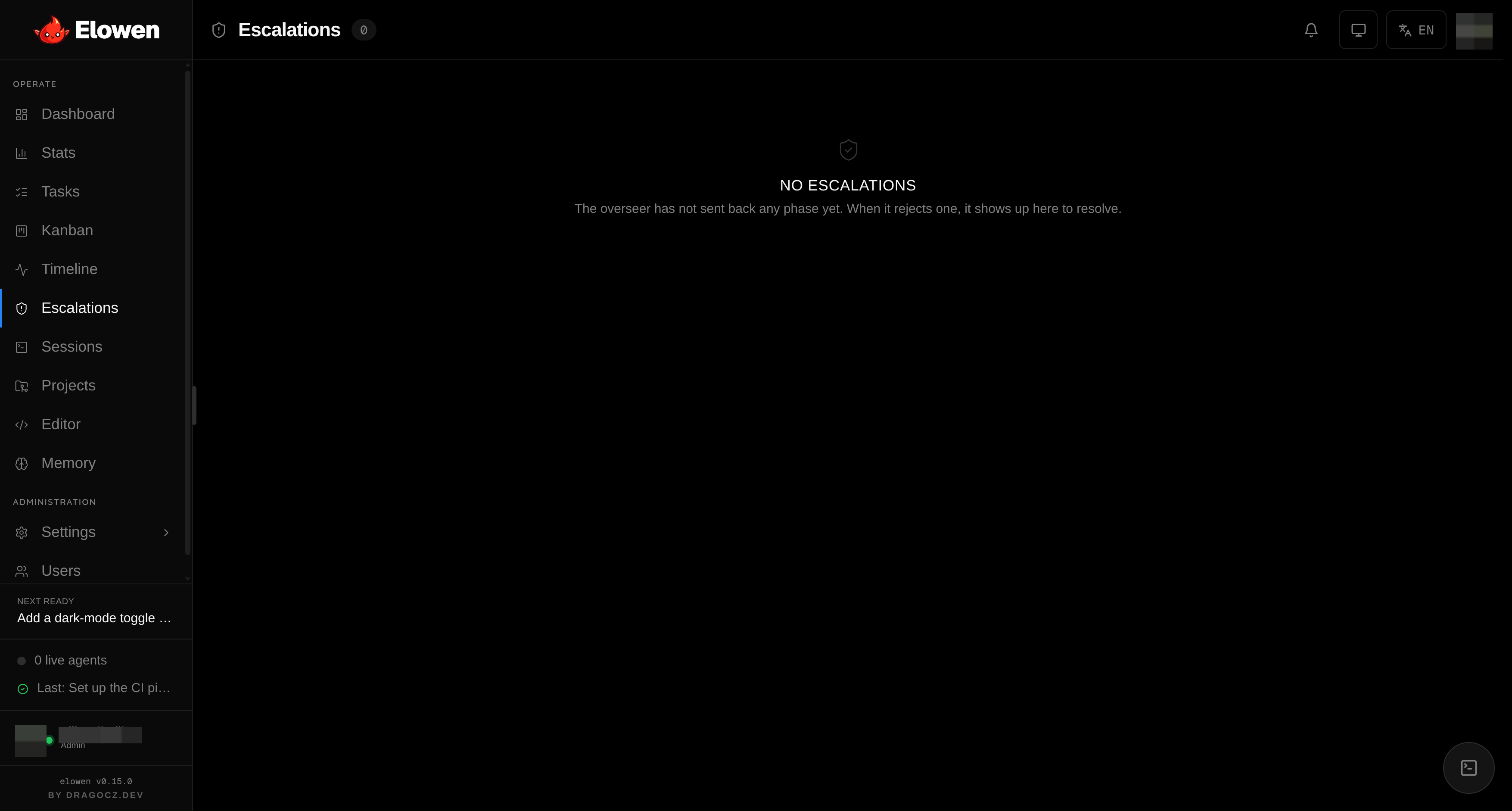
Escalations is your human-in-the-loop gate — approve, reject, or answer, all
from one place. See Web UI for the full inbox, and CLI for the
elowen ask command and its --history flag.
Stuck detector
The stuck detector sweeps every 60 seconds for in_progress tasks whose
agent session is no longer alive. It reverts a dead-agent task to open (up to
2 retries), then moves it to blocked to prevent an infinite crash loop.
When it reverts a task, it writes a resume note explaining why the task was
relaunched, so you (or the next agent) have the context. See
Tasks & Missions for task states.
Session resume
When Resume sessions is enabled for a provider, the daemon captures the agent's CLI session id when the session closes and splices a resume flag into the next spawn. The agent reattaches to its prior conversation instead of cold-starting — it keeps its context, its plan, and its place in the work.
Persistent goals (/goal)
The autonomy levels above govern spawned mission agents. The embedded Elowen AI
brain — the agent you chat with — has its own autonomous mode: a persistent
goal. Set one with /goal <what you want> and the brain works toward it turn
after turn on its own, checking its own progress, until the goal is done, it hits
a blocker, or it exhausts its turn budget.
Each goal turn follows a small sentinel protocol the brain is taught:
PROGRESS: …— a one-line note of what the turn accomplished. It's carried forward across turns even after older messages are compacted away, so a long goal keeps its bearings.GOAL_DONE: <evidence>— the only way to finish. It must cite concrete evidence (passing tests, command output, a reviewed diff), and it's rejected if any subgoal is still open — so a goal can't declare itself done prematurely.GOAL_BLOCKED: <reason>— stop on an unresolvable blocker (missing credentials, a required decision, an unsafe step) instead of looping the budget away. The goal pauses for you.SUBGOAL_DONE: <n>— check off a subgoal as it lands.
Break a goal into checklist items with /subgoal <text> (and /subgoal remove <n> / /subgoal clear). /goal draft writes a structured contract — outcome,
verification, constraints, boundaries, stop-when — for review before you commit
to running it. /goal status, /goal pause, /goal resume and /goal clear
manage a live goal; a headless run takes --max-turns <n> for its budget.
Turn budget & the YOLO ceiling
Every goal carries a turn budget — the number of autonomous turns it may run before it stops to check in with you. The default is 8 (configurable per instance under Settings → Elowen AI → Limits, range 1–50). What happens when the budget is spent depends on whether the session runs in YOLO:
- Supervised (not YOLO) — the goal pauses at budget with a
budget_reachedverdict. You confirm continuation with/goal resume, which grants a fresh budget window. This is the point where a human stays in the loop. - YOLO — the goal keeps going past a spent budget so it can finish
unattended, but never past an absolute safety ceiling (
goalMaxTurns, default 64, range 8–500). Even in YOLO the loop pauses at the ceiling, so a runaway goal can never burn tokens forever.
"YOLO" here is the effective YOLO — a session /yolo override layered over your
persisted permission default, resolved exactly the way tool approvals are. So
/yolo off supervises the goal too, pausing it at budget for your confirmation.
Losing the driver
A persistent goal only advances while its conversation has a live driver — it's
your active conversation, or a bound CLI stream is attached to it. Switch away
and the goal pauses rather than running unattended in the background. And
because in-memory continuation timers don't survive a restart, a daemon reboot
pauses every active goal. Autonomous work never self-resumes — matching Elowen's
"escalation waits, nothing self-starts" rule — you bring a paused goal back with
/goal resume. See Brain & Chat for the embedded agent.
© 2026 Elowen · MIT Licensed
Reference on GitHub