
Plugins
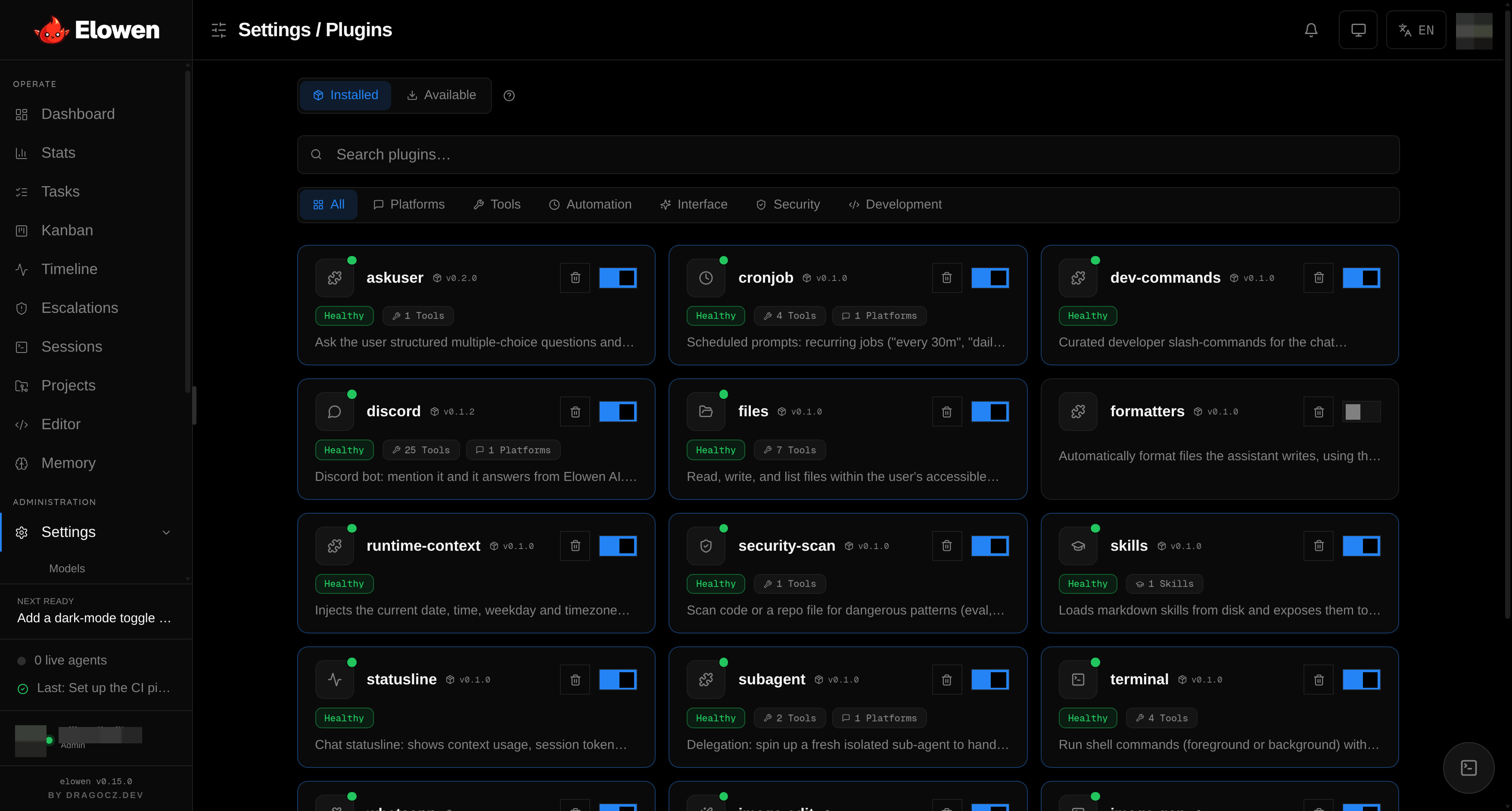
Elowen is a personal AI agent you chat with — and almost everything that agent can do arrives as a plugin. Chat platforms, tools, skills, memory, automation, security checks, even the little status line under the chat: each is a self-contained module you can add or remove. Elowen is modular to the core.
That is the third pillar in practice. The agent's capabilities are not baked in; they are composed. You decide which platforms it answers on, which tools it may call, and which extras it loads — and you can change your mind without touching the codebase.
Everything is a plugin
Plugins register their capabilities with the brain (the embedded agent core you talk to — see Brain & Chat) at runtime. Elowen ships fourteen bundled plugins out of the box: the platforms discord and whatsapp; the tools files, terminal, mcp, subagent and askuser; automation via cronjob; the surface extras statusline and runtime-context; security-scan; and the authoring/workflow set skills, formatters and dev-commands.
In the marketplace you can filter by category — a lightweight display grouping derived from what each plugin declares (a chat platform → platforms) and its name, not a capability system:
| Category | What it covers |
|---|---|
| platforms | Chat surfaces the agent lives on — Discord, WhatsApp |
| tools | General actions — mcp, askuser, and the rest |
| memory | Long-term recall of events and facts |
| automation | Scheduled and recurring work — cronjob |
| ui | Chat-surface extras — statusline |
| security | Advisory safety checks — security-scan |
| development | Authoring & code workflow — files, terminal, skills, formatters, dev-commands |
Manage them all in Settings → Plugins. Every plugin has a toggle, its own config form, a detail page (with a hero illustration, its live tools, hooks and a derived permissions summary), and a remove action — bundled plugins are hidden and stop loading but stay on disk (restorable from the Available tab), while ones you installed yourself are uninstalled outright.
The marketplace
Bundled plugins ship with Elowen, but you are not limited to them. Elowen includes a plugin marketplace: a curated registry you browse from Settings → Plugins to install, update, and uninstall extra plugins.
- Browse — the catalog lists each plugin with its name, category, a short description, and how much it provides (counts of tools, skills, and platforms), so you know what you're adding before you add it.
- Install — one click pulls the plugin into your user plugins and loads it live.
- Update — when a newer version is published, the entry shows update available; updating swaps it in place.
- Uninstall — a plugin you installed is removed outright (its folder and data are deleted). A bundled plugin can't be deleted from disk — removing it instead soft-removes it: it disappears from the installed list and stops loading, but its files stay, so you can restore it from the Available tab any time.
The marketplace only offers install/update on plugins it owns, never on the built-ins. Installs are allowed only for names the registry publishes, so the trust surface is simply "do you trust this registry", the same posture as the Elowen package itself. If the registry can't be reached (offline, for example), the UI tells you the marketplace is unavailable rather than pretending the catalog is empty.
Plugin anatomy
A plugin is a directory with a manifest and an ESM entry point:
plugins/<name>/
├── orca-plugin.json    # name, version, apiVersion, entry, provides, configSchema
└── index.mjs           # exports register(ctx) — ESM only
Manifest fields
| Field | Required | Description |
|---|---|---|
name | ✓ | Plugin identifier (kebab-case) |
version | ✓ | Semver, used for update detection |
apiVersion | ✓ | Plugin API version — must equal 1 or the loader skips the plugin |
description | ✓ | One-line summary shown in the UI |
entry | ✓ | Entrypoint relative path (e.g. index.mjs) |
provides.tools / .platforms / .skills / .hooks | Declarative hints of what the plugin contributes | |
requires.config / .env | Config keys / env vars required before the plugin activates | |
configSchema | Field schema that renders the settings form | |
capabilities | What the plugin is allowed to do — deny-by-default (see below) | |
icon | Brand icon (SVG, defaults to icon.svg) shown on cards and the hero | |
icons | Per-tool emoji shown in the chat clients' tool-call lines |
provides is declarative — display and validation hints. The authoritative
contributions come from register(ctx) at load time, so the detail page's Tools
and Hooks panels show what actually went live, not just what the manifest
promised.
Config field types
The configSchema array is the whole settings form — the UI renders one control
per field, in declared order. When the schema declares section headers, each
section becomes its own collapsible panel; otherwise fields are auto-bucketed
into connection/behaviour groups.
| Type | Renders as |
|---|---|
string / textarea | Single-line / multi-line text |
secret | Write-only password field — the API only reports whether it's set |
boolean | Toggle |
number | Numeric input honouring min, max and step |
enum | Single choice from options (segmented control) |
multiSelect | Multiple choices from options |
model / embeddingModel | Grouped provider→model picker from your catalog |
provider | Picker of configured brain providers (reuses that provider's key); providerType narrows it to one type |
code / prompt | Monaco editor (language sets the syntax mode; prompt is markdown) |
json | JSON blob, validated as you type — a malformed value never saves |
rolePolicies | Structured role → projects + prompt + tool-allowlist editor (Discord/WhatsApp) |
mcpServers | List editor for external MCP server specs |
section | A labelled group header carrying no value |
Presentation props any field can add: hint (one-line) and help (a richer
tooltip), required, risk (low/medium/high, surfaced as a badge), and
visibleWhen (show the field only when another field equals a given value).
Number bounds and defaults. Numeric fields carry min/max/step so the
input can't drift out of a sane range — e.g. the cronjob tick interval is clamped
to 10000–120000 ms in 5000-ms steps. A field's default is the value the
form pre-fills on a fresh install, and it always mirrors the plugin's own runtime
fallback, so the pre-filled number never silently changes behaviour. Examples:
the files plugin defaults its read cap to 100000 characters, terminal's command
timeout to 120000 ms, and MCP's tool-call timeout to 120000 ms.
Capabilities & permissions
A plugin's capabilities block is a deny-by-default contract: a manifest with
no capabilities can mutate nothing. It gates runtime hook patches — mutates
lists what a hook may change (prompt, turnContext, tools, memory; only
turnContext is patch-wired today), network is declared intent, and reads
lists read scopes the plugin claims. The detail page's Permissions panel
surfaces all of this alongside a derived risk level (from secrets, network reach
and tool count) and the list of required credentials/config, so you can see a
plugin's blast radius before you trust it.
Registry API (ctx)
The register(ctx) function receives a context object — the plugin's entire
contract with the agent:
| Method | Purpose |
|---|---|
ctx.registerTool(tool) | Add a tool to the brain's toolset |
ctx.registerPlatform(platform) | Add a chat platform adapter |
ctx.registerSkill(skill) | Register an inline skill |
ctx.registerTurnContext(fn) | Inject per-turn context |
ctx.dataDir() | Writable per-plugin data directory |
ctx.config | Current config values |
ctx.logger | Plugin-scoped logger |
ctx.isAdminSession() | Is the current user an admin? |
ctx.assertPathAllowed(path) | Security path guard for file access |
Hot-reload
You don't restart the daemon to reconfigure your agent. Enabling, disabling, or saving a plugin's config triggers a hot-reload — the change applies to running conversations immediately. This keeps the second pillar honest: changing what the agent can do is low-friction and low-risk.
Platforms: Discord & WhatsApp
Platform plugins are where you actually meet the agent. You write; it answers from Elowen AI, streams its work, and pushes to you proactively.
Discord
A full Discord bot (no external client library — it uses Node's native
WebSocket and fetch against the v10 Gateway). By default it answers every message
in channels it can see; flip Respond without mention off and it only replies
when @mentioned.
- Slash commands:
/model,/voice,/new,/stop,/status,/compact,/help - Per-channel model picker (operator-gated)
- Streamed replies with a live todo checklist and tool-call trace
- Status reactions (👀 → ✅ / ❌) and an optional runtime footer
- Image attachments → vision input (with an optional dedicated vision model); optional Whisper transcription of voice messages and TTS spoken replies (reusing a configured OpenAI-compatible provider's key)
- Proactive cron/tick pushes into a notification channel
- A large server toolset for admin sessions — channels, roles, members, threads, pins, and messages
Each Discord role maps to a set of allowed Elowen projects, a role prompt and the tools the bot may use for it, so who can reach which project is policy, not luck. The first matching role wins; members with no mapped role are silently ignored. Configure in Settings → Plugins → discord.
Talk to Elowen from WhatsApp, powered by Baileys. Write a message and it answers from Elowen AI.
- Text commands:
/model,/new,/help - Per-chat model menu — a numbered list you reply to with a number
- Edit-in-place streaming replies with the agent's tool trace
- Status reactions and a small runtime footer
- Proactive pushes (cron/tick results, escalations, restart notices) to a chat you nominate
- Group tools for admin sessions — list and inspect groups, create groups, add/remove members, and send to any chat
Each sender — a phone number, a JID, or a whole group — maps to allowed projects
and a role prompt, and a policy can further restrict which tools the bot may use
for it. Pair the bot by scanning a QR code from the plugin logs, or set a
phoneNumber to get an 8-character pairing code instead. Configure in
Settings → Plugins → whatsapp.
Tools: files, terminal, mcp, subagent, askuser
Tools are the verbs of your agent. Which ones a given user's agent may call is
governed by RBAC — an admin can grant one user the terminal and files tools and
give another only chat, per user, via disabled_tools. See
Account & Security.
files
File-system access scoped to your Elowen projects:
| Tool | Purpose |
|---|---|
read_file | Read file contents |
write_file | Write or overwrite a file |
edit_file | Targeted edit with a diff display |
list_dir | List directory contents |
search_files | Search for content across files |
file_info | Metadata about a file |
git_status | The repo's git status |
Every path is guard-checked against the user's allowed project roots — the agent can't wander outside repos you gave it. Read and search output is capped (default 100k characters / 200 matches) so a huge file can't blow up a turn.
terminal
Shell execution, scoped to the accessible repo:
| Tool | Purpose |
|---|---|
run_command | Run a foreground command (CWD = repo) |
list_processes | List background processes |
read_process_output | Read a background process's output |
kill_process | Kill a background process |
Foreground commands show output inline; background processes persist across turns. In shared-channel platforms (like Discord) these tools are owner-only.
mcp
Bridge external MCP servers into the agent's toolset. Add servers in the
plugin config and choose a transport per server: stdio launches a local
process (e.g. npx …), while HTTP or SSE connect to a remote URL. stdio
servers run in their own process group and are cleaned up as a group on reload,
so child processes are never orphaned. Their tools appear alongside the built-in
ones.
subagent
| Tool | Purpose |
|---|---|
delegate | Spawn a fresh, isolated sub-agent for a focused subtask |
delegate_models | List the models a delegated sub-agent can run on |
The sub-agent inherits exactly the caller's access — never more — and returns its result to the parent. Good for keeping a long task's context clean.
askuser
| Tool | Purpose |
|---|---|
ask_user_question | Pose structured questions and wait for the answer |
When the agent needs a decision from you, it asks — one or more questions with predefined options (single- or multi-select, with an optional free-text answer). You pick in the chat (CLI/web), via Discord buttons/selects, or with a numbered WhatsApp reply, and the turn resumes with your choice.
Automation: cronjob
Scheduled work for the agent (admin-only). Cron jobs are prompts that run as the brain's own conversations — the agent wakes up, does the work, and reports.
Schedule formats:
| Pattern | Example | Recurring |
|---|---|---|
| Every N minutes | every 30m | ✓ |
| Every N hours | every 2h | ✓ |
| Daily at time | daily 07:30 | ✓ |
| Weekly on day | weekly mon 09:00 | ✓ |
| In N minutes | in 15m | One-shot |
| At time today | at 18:30 | One-shot |
- Active-hours window — a guard like
5-21or22-5(overnight wrap) - Per-job model override — run a job on a different model than the default
- Guard command — a cheap shell gate that skips the LLM unless output matches
- Silent replies — a
NOTHING_TO_REPORTresult is suppressed, no noise - Target channel — route results to a specific chat/thread
Configure in Settings → Plugins → cronjob.
Security: security-scan
An advisory static scanner — the safety-conscious pillar in a small package.
| Tool | Purpose |
|---|---|
scan_code | Scan files for dangerous patterns |
It flags patterns like eval, pickle.load, shell=True, unpinned
deserialization, and hardcoded secrets, classifying findings as danger or
warn. It reports — it never executes anything.
Development: skills, formatters & dev-commands
skills
Loads Markdown skills from disk and exposes them to the agent so it can pull
in focused, reusable know-how on demand (read_skill, create_skill,
list_skills, delete_skill).
- Bundled skills ship with Elowen and are read-only
- User skills are created with the
create_skilltool or the Settings editor - Format — Markdown with YAML frontmatter (
name,description) - Hot-reload — new or changed skills apply to new conversations immediately
Configure in Settings → Plugins → skills.
formatters
Runs the project's own formatter right after the agent writes or edits a file, so
generated code lands already tidy. It hooks tools.call.after and picks the
formatter the repo is actually set up for — prettier, biome, Laravel Pint, ruff,
gofmt, rustfmt, clang-format, mix format, terraform fmt, shfmt — running one
only when its binary or config is present. Auto-formatting is on by default; you
can switch it off entirely, disable specific formatters, or tune the subprocess
timeout and file-size cap in its config.
dev-commands
A set of opt-in developer slash-commands for the chat surfaces — /commit,
/review, /test, /explain, /pr, /docs. Each is a reusable prompt macro:
type it (optionally with an argument) and the agent runs that workflow. Pick which
to expose in the config (leave the list empty to enable them all).
UI: statusline & runtime-context
Small surface extras that keep the chat honest and grounded — the clarity pillar.
statusline prints a footer under the chat — in the web dock and the elowen
chat CLI — with what you choose to show. Every metric is off by default; switch
on the ones you want:
| Metric | Description |
|---|---|
| Model | Current model name |
| Context | Context-window fill percentage |
| Tokens | Total tokens used this session |
| Cost | Running cost estimate (subscriptions report $0) |
runtime-context injects the current date, time, weekday, and timezone into
every turn, so the agent never guesses about "now". It's cache-safe — it rides
the user message, not the system prompt. Set the timezone in its config (default
Europe/Prague).
Memory
Long-term memory — the agent remembering events and facts across conversations — is a capability you configure under Settings → Memory (and the related plugin controls). For how automatic recall, conscious save, and the "glass brain" view work in a chat, see Brain & Chat. For the settings themselves, see Configuration.
Which plugins your agent runs, and which of their tools each user may call, is exactly the kind of thing Elowen's RBAC lets you tune per person. To see the whole agent from the outside — dashboards, sessions, and the Plugins screen — read Web UI.
© 2026 Elowen · MIT Licensed
Reference on GitHub